Chat on the site
Without a ChatGPT or Claude subscription you can talk to Predok in the chat on the site itself. The Predok tools are connected in it from the start.
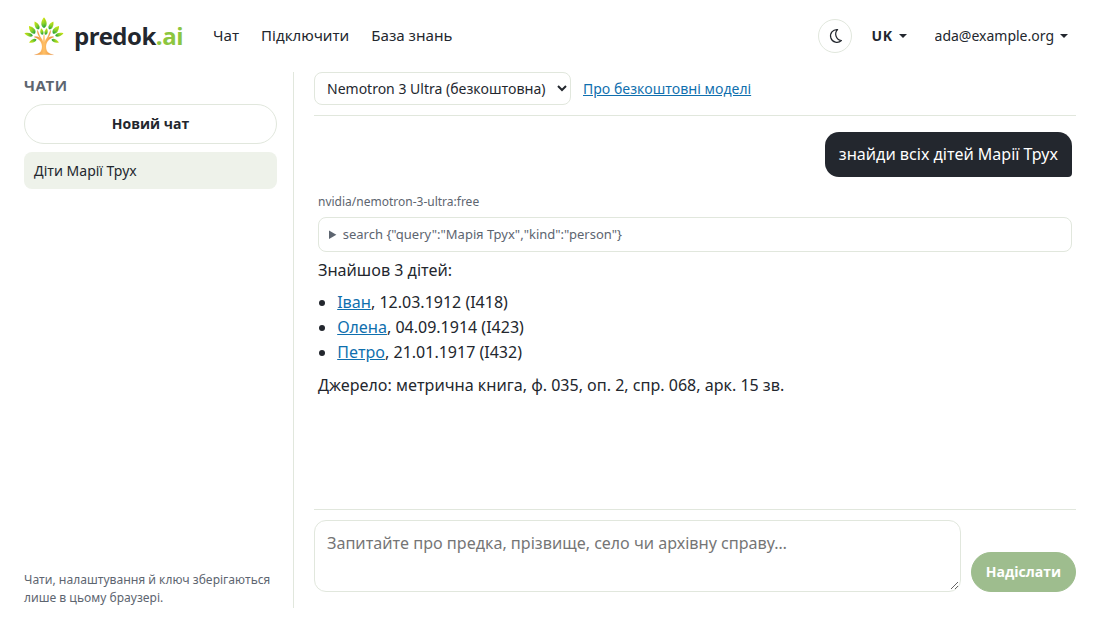
- Sign in to the site with Google and open Chat in the menu.
- Click Connect OpenRouter models. OpenRouter is the service the chat uses to reach AI models; you can sign in there with Google too. The OpenRouter key stays in your browser and never reaches the Predok server. If you have no OpenRouter account yet, after signing up OpenRouter may show a survey and not bring you back to the chat: then open the chat again and click Connect OpenRouter models once more; this time you only need to allow access.
- Choose a model at the top of the conversation. Free ones come first; the default is Nemotron 3 Ultra.
- Ask your question. When the model searches Predok, the conversation shows a collapsed block with the tool name and its result.
Free models and limits
Free models have :free in their name. Until you add credits to OpenRouter, you can make 50 requests a day and 20 a minute to them; after adding at least 10 dollars, 1000 a day. One answer with a search takes several requests. Free models are weaker than paid ones in long research with many steps. Paid models are charged to your OpenRouter balance.
Who sees the requests
Providers of free models may log requests and train models on them. Do not write anything you would not give to strangers: private facts about living people, addresses, phone numbers. Which providers are allowed is set in the OpenRouter privacy settings (Settings → Privacy); if OpenRouter replies that no provider of the model fits your data policy, change the setting there or choose another model.
Data in your browser only
Chats, settings and the key are kept in this browser; the Predok server does not have them, only tool requests go through it. Another browser or device does not see them, and clearing the site data erases them. To keep or move them, use Settings → Export and Import. You can revoke the key on openrouter.ai.
Predok credits
The chat's calls to the Predok database are counted in credits the same way as for the connector and the plugin: pricing, the balance is in your profile. You pay nothing extra for OpenRouter models while you use the free ones.